
Improve customer experience
What makes our service hard to use?
Compare ratings with comments and identify a change worth testing.
Explore the customer service example →Research for businesses and research agencies.
Gather customer feedback, understand the reasons behind their ratings and prepare recommendations for your team. StrefaAnkiet brings surveys, interviews and analysis together in one project workspace.
The demo and tutorials are available immediately without an account. Platform access follows the current registration terms.
Start with your question
What makes our service hard to use?
Compare ratings with comments and identify a change worth testing.
Explore the customer service example →Are we solving a problem that matters to our audience?
Organise needs, reactions to the idea and reasons for the next step.
Start with the research objective →What helps the team, and what gets in the way?
Gather feedback and prepare discussion topics while controlling access to materials.
Explore teamwork →For research agencies and consultancies
From the client brief through interviewing and analysis to the report. StrefaAnkiet helps teams run quantitative and qualitative projects and retain the sources behind each recommendation.
01
Organise studies, materials and results in client projects. Surveys and conversations remain separate studies that can be compared in a combined analysis.
02
Prepare the questionnaire, assign work and monitor progress. Roles and permissions determine who conducts the study, analyses materials and views results.
03
Retain calculation context, data versions and quotation sources. Prepare a PDF or DOCX report for team review and discussion with the client.
Online surveys (CAWI), telephone interviews (CATI), fieldwork (CAPI), CSV and SAV import and qualitative analysis. Module access, telephony configuration and additional service terms are confirmed before activation.
Tell us about your methods, team size and reporting process.
Explore the standard subscription ↓
Surveys show how opinions are distributed. Conversations help explain why. Combined analysis leads to a recommendation you can discuss with your team.
Prepare a survey and collect comparable responses.
Examine conversations, themes and specific statements.
Combine evidence, describe limitations and propose a next step.
A project organises separate quantitative and qualitative studies. Combined interpretation preserves context and source versions.
From a client brief or research question to analysis backed by sources.
Organise client research, teamwork and reporting. Explore the agency demo and lessons.
Explore this demo (PL) → Lessons for this path (PL) →Keep quantitative and qualitative studies separate, preserve data versions and quote sources, and document methods and interpretation limits.
Explore this demo (PL) → Lessons for this path (PL) →These two specialised paths and their lessons are in Polish. The general demo and question guide are available in your selected language.
The complete research workflow
Expand an area that interests you. Each description explains its use, features and activation requirements.
Build a form that asks the right people the right questions.
Share a browser-based form and monitor response collection.
Interviewers know whom to call, what happened previously and when to call back.
Prepare interviewer assignments and collect responses even without a connection.
Retain the statement, its context and its source, rather than just a summary.
Work with study results or an imported dataset while retaining calculation context.
Everyone works within their role and responsibilities.
Combine survey results with quotations and explain the basis for your recommendation.
Your account’s scope depends on your role, enabled modules and organisational configuration. Integrations and additional services are confirmed before work begins.
From question to analysis
Choice questions, scales, NPS, rankings and matrices help you compare responses. Open questions help explain the reasons. The guide shows what you can analyse for each type.
Respondents can select a point on a map or choose an area. Analyse aggregated results by grid cell or area and download GeoJSON. Spatial questions require module activation and privacy and retention settings.
Descriptive statistics, cross-tabulations and weighted tables, correlations, Welch tests, regression and scale reliability. Match the method to your data and assumptions; calculations depend on the R engine configuration.
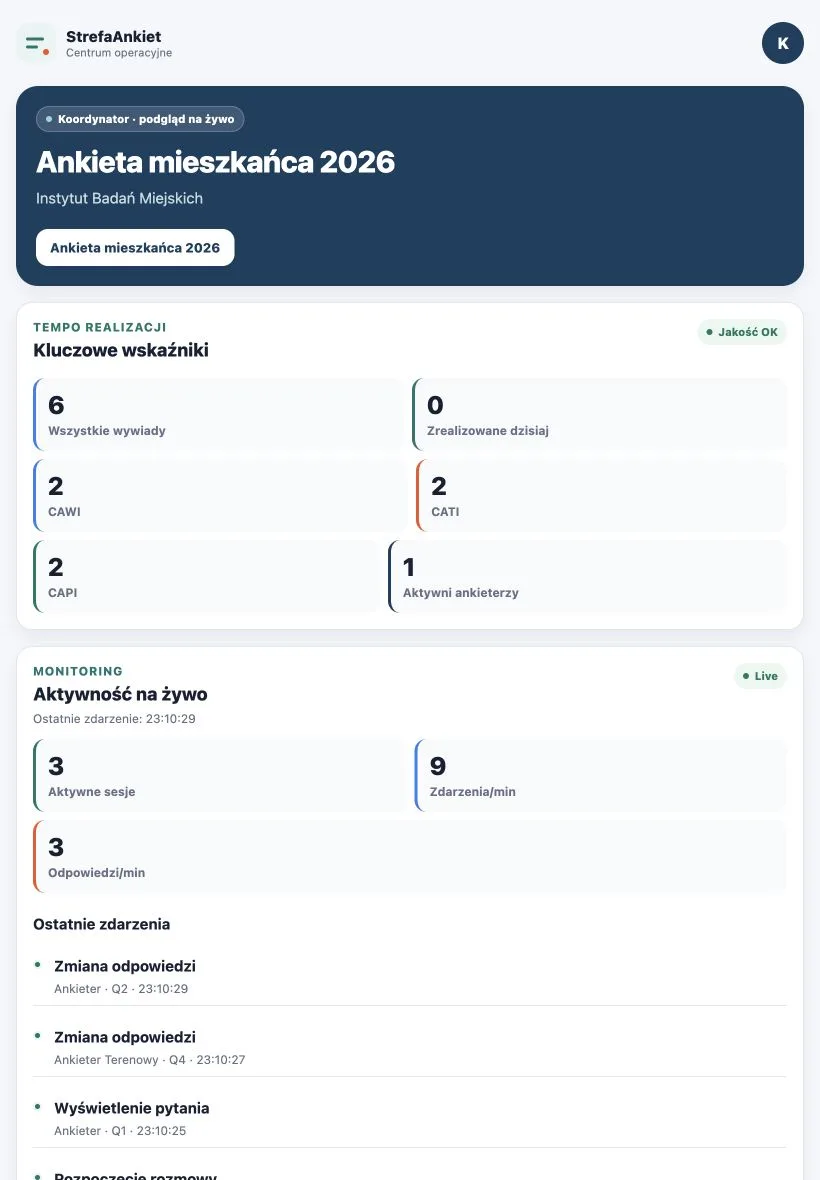
CAWI collects responses online, CATI supports telephone interviews and CAPI supports field interviewers. Coordinators monitor progress and quality. Interview GPS data and a point selected by a respondent are two different sources of information.
AI supports analysis when enabled separately. People review its suggestions and interpretation; surveys and manual coding also work without AI.
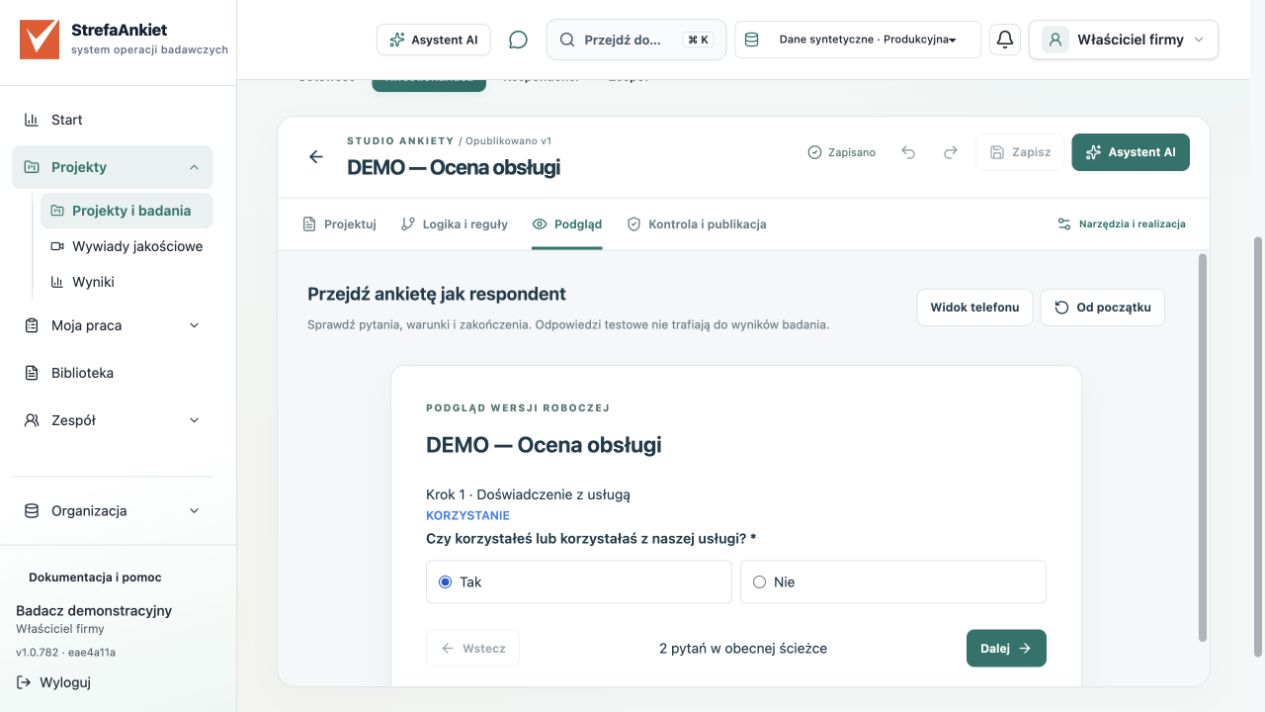
Prepare an online form. Add telephone interviews or field interviewers when the study requires them.
Explore this step in the demo →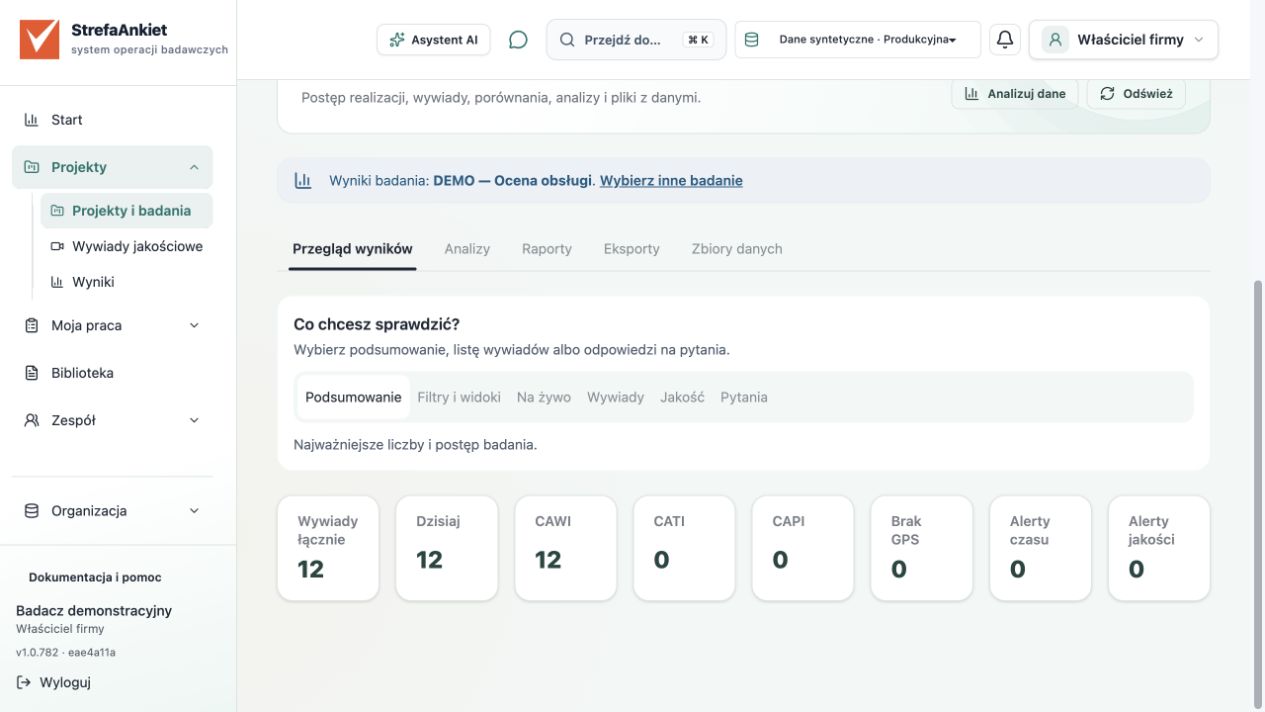
Monitor the number of collected responses and check the scope of the result before interpreting it.
Explore this step in the demo →Compare completed survey analysis with approved quotations. Record what supports each other and what needs explaining.
Explore this step in the demo →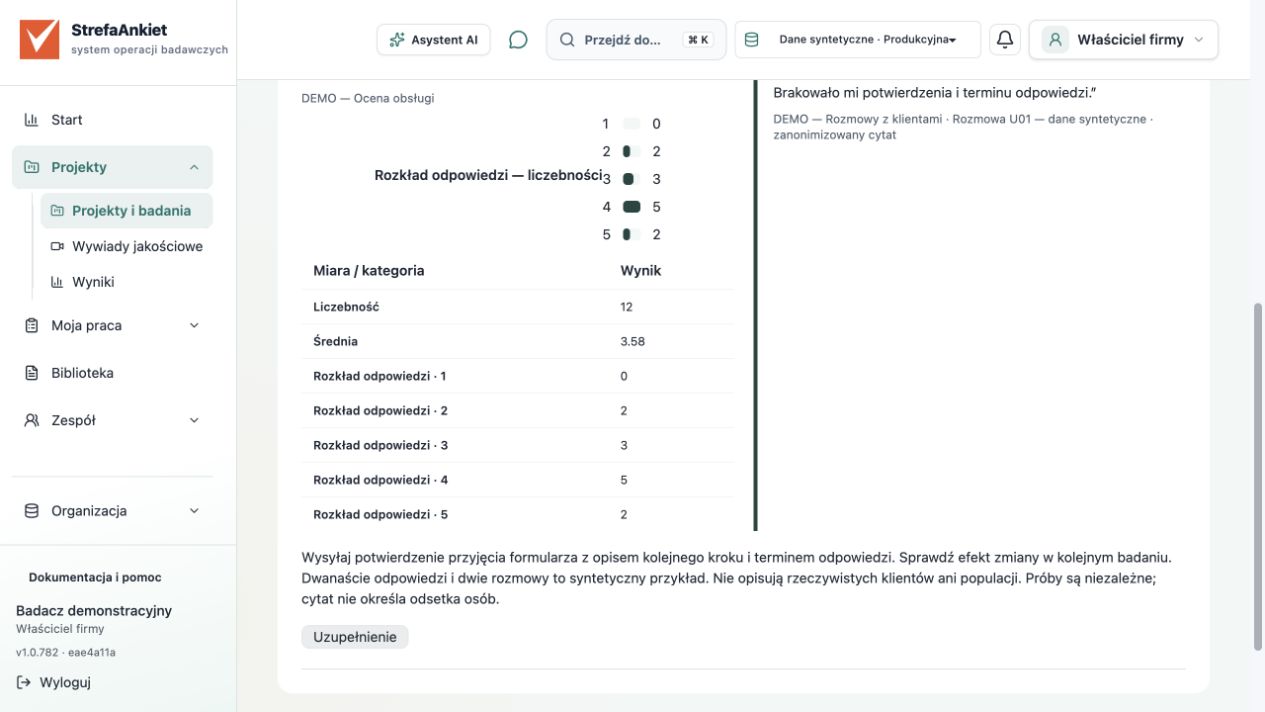
Retain sources, context and limitations. Prepare a PDF or DOCX report for review and discussion.
Explore this step in the demo →The outcome
A result, a quotation, an interpretation and a proposed change. Readers see the recommendation, and you can explain its evidence.
Download a sample PDF report ↓ (PL)Synthetic demonstration data only
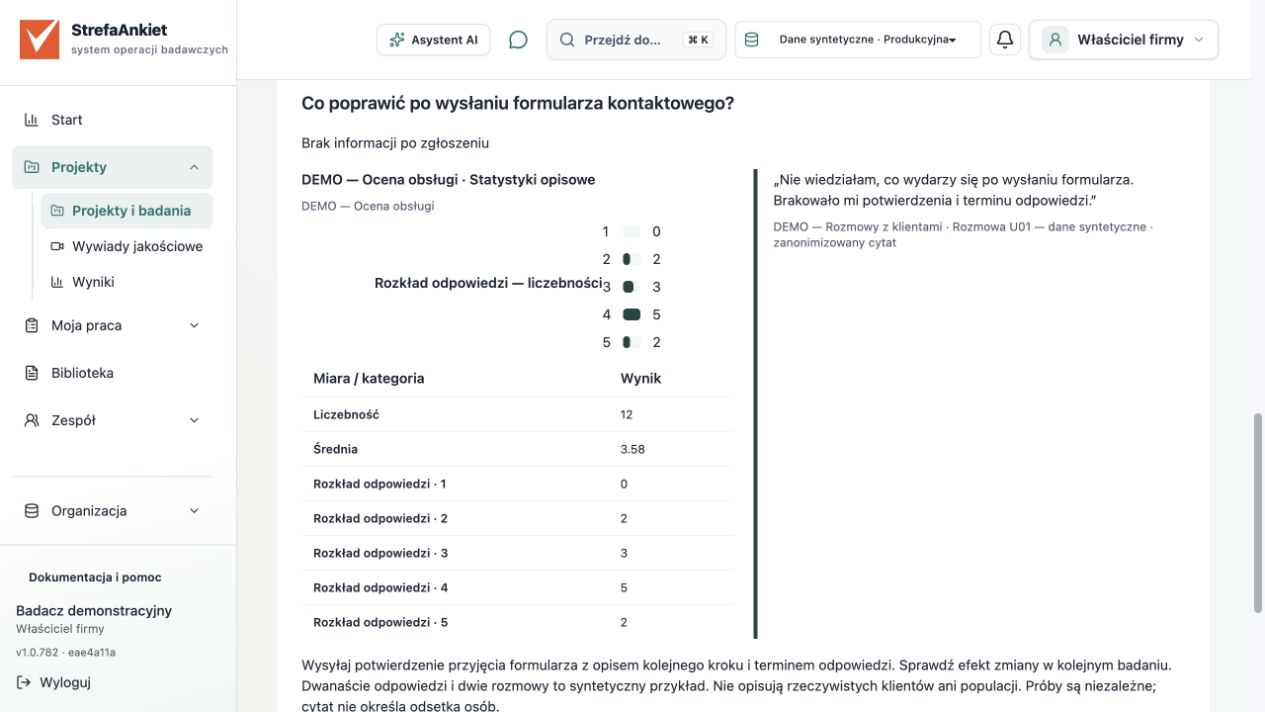
12 survey responses · 2 separate conversations
„I did not know what would happen after submitting the form. I needed a confirmation and a response timeframe.”
Interview U01 · anonymised version 1 · 00:42–01:03
Recommendation: Send a confirmation of receipt explaining the next step and when to expect a response. Evaluate the change in a follow-up study.
Account → email verification → project → short survey → preview.
Tutorials use the Polish application interface. You can follow the demo and question guide in your chosen language.
CATI telephone interviews, CAPI fieldwork, CSV and SAV import, weighted tables and statistical analysis in R support more complex projects. Mobile team tools are distributed internally.
Data and responsibility
Access depends on the organisation, workspace and permissions. Sharing a link does not grant access to results or materials.
Mark sensitive fields, set retention and check export scope. Aggregated spatial results have a publication threshold.
Integration requires activation, a provider and permissions. The system limits context and applies masking; check the material and organisational policies before use.
AI suggestions do not replace a researcher’s judgement. Version history, analysis settings and sources help you revisit the evidence behind a result.
Choose how to work together
An organisation account and a shared workspace. Start with the demo, check registration availability and choose the modules you need.
Let’s discuss a separate environment, integrations, configuration and support. Terms and readiness are confirmed for each deployment.
Partners can discuss a white-label model and an own-brand offering. Scope, maintenance and responsibilities are agreed individually.
Clear terms
Standard monthly subscription:
1 299 PLN excluding VAT.
The 14-day card-free offer is being prepared for launch. Account review and confirmation of the available scope currently apply.
Go to registration →Additional services: telephony, bulk messaging, online rooms, AI and transcription require separate configuration and billing terms. They are not activated automatically with the trial.
Short videos show each step in StrefaAnkiet and its outcome. Watch with Polish captions or expand the Polish transcript below.
Tutorial video · 1:30 min
Explore the research workflow: from a project objective through surveys and customer interviews to a recommendation for your team.
Audio, captions and transcript are in Polish.
Klienci oceniają usługę. Chcesz wiedzieć, co poprawić, ale sama liczba nie wyjaśnia przyczyny. W Strefie Ankiet możesz przejść od pytania do rekomendacji w jednym projekcie.
Zacznij od krótkiej ankiety. Zapytaj o skorzystanie z usługi, ocenę i propozycję poprawy. Warunek pozwala pokazać pytanie o ocenę tylko osobom, których ono dotyczy.
Sprawdź wyniki razem z liczebnością. W naszym syntetycznym przykładzie mamy dwanaście odpowiedzi. Mały zbiór służy do demonstracji, nie do wyciągania wniosków o rzeczywistych klientach.
Teraz sięgnij do rozmowy. Uczestniczka mówi o braku informacji po wysłaniu formularza. Temat prowadzi do cytatu, a cytat do jego źródła.
Zestaw wynik ankiety z wypowiedzią. Zapisz interpretację i ograniczenia. To osobne próby: rozmowa podpowiada możliwe wyjaśnienie, lecz nie dowodzi przyczyny różnicy ocen.
Przekaż zespołowi rekomendację: potwierdzenie zgłoszenia z kolejnym krokiem i terminem odpowiedzi. Zobacz demo, a potem zacznij własne badanie.
Tutorial video · 3:06 min
Arrange questions, set a simple condition and check the form before sharing it with customers.
Audio, captions and transcript are in Polish.
Przygotujmy pierwszą ankietę klientów w Strefie Ankiet. Pracujemy na danych syntetycznych. Firma chce poprawić doświadczenie po wysłaniu formularza kontaktowego. Naszym celem jest ustalenie, o co zapytać i jak sprawdzić formularz przed udostępnieniem.
Najpierw zapisz decyzję, którą ma wesprzeć badanie. W projekcie Doświadczenia klientów prowadzimy ankietę Ocena obsługi. Projekt może zawierać kilka badań. Każde zachowuje własnych uczestników, realizację i analizę. Dzięki temu wiadomo, skąd pochodzą późniejsze wyniki.
Otwórz Kwestionariusz i zakładkę Projektuj. Pierwsze pytanie ustala, czy osoba korzystała z usługi. Dodaj odpowiedzi Tak i Nie. Pytanie powinno być krótkie i jednoznaczne. Nie łącz w nim korzystania z usługi z oceną jej jakości.
Drugie pytanie dotyczy oceny obsługi w skali od jednego do pięciu. Ustal znaczenie obu końców skali. Zastanów się, czy odbiorca będzie je rozumiał tak samo jak Ty. Każdemu pytaniu nadaj stabilny kod. To pomaga rozpoznać zmienną podczas późniejszej pracy z danymi.
Trzecie pytanie jest otwarte: co warto poprawić w pierwszej kolejności? Jedna konkretna propozycja będzie łatwiejsza do omówienia niż odpowiedź na kilka pytań zadanych naraz. Pole otwarte może pozostać opcjonalne.
Teraz ustaw warunek widoczności oceny. Pokaż ją po odpowiedzi Tak na pytanie o korzystanie z usługi. Osoba, która nie korzystała, nie powinna oceniać doświadczenia, którego nie ma. Warunek wyświetlania i skok w formularzu to różne mechanizmy. Sprawdź cały przebieg, jeśli stosujesz je razem.
Przejdź do Podglądu. Wybierz Tak, zaznacz ocenę i wpisz przykładową propozycję. Następnie zacznij od początku i wybierz Nie. Sprawdź, czy pytanie o ocenę jest pomijane. Wróć także do wcześniejszego pytania i zmień odpowiedź. Sam widok jednej poprawnej ścieżki nie wystarcza.
Podgląd wersji roboczej nie dopisuje odpowiedzi do właściwych wyników badania. Włącz widok telefonu. Oceń długość tekstów, wygodę wyboru i komunikaty o wymaganej odpowiedzi. Pomyśl o osobie, która zobaczy formularz pierwszy raz.
Na koniec otwórz Kontrolę i publikację. Rozwiąż błędy i sprawdź wersję przed jej udostępnieniem. Opublikowany formularz, działający link i zapis odpowiedzi to kolejne rzeczy do potwierdzenia. Nie oznaczają automatycznie dostarczenia zaproszenia.
Twoje ćwiczenie: odtwórz trzy pytania na danych testowych i przejdź obie ścieżki. Potrafisz wskazać cel każdego pytania, sprawdzić warunek i rozpoznać zapisaną odpowiedź testową. Szczegółowe kroki oraz pliki znajdziesz w samouczkach Strefy Ankiet.
Tutorial video · 3:31 min
Organise responses into themes and check the source of a quote before using it in your report.
Audio, captions and transcript are in Polish.
Sama ocena usługi nie wyjaśnia całego doświadczenia. W tej lekcji przejdziemy od rozmowy do cytatu, którego źródło można sprawdzić. Korzystamy z fikcyjnych materiałów przygotowanych do nauki.
Otwórz projekt Doświadczenia klientów, a następnie osobne badanie jakościowe Rozmowy z klientami. Ankieta i rozmowy mogą należeć do jednego projektu, lecz mają własny przebieg pracy i własne źródła. Nasze dwie rozmowy są niezależne od dwunastu odpowiedzi z ankiety. Nie przypisujemy uczestników rozmów do rekordów ankiety.
W Materiałach zobaczysz listę dostępnych dokumentów. Do ćwiczenia używamy gotowej transkrypcji. Możesz importować tekst oraz obsługiwane pliki dokumentów i napisów. Import tekstu i automatyczna transkrypcja nagrania to różne czynności. Usługa transkrypcji wymaga konfiguracji, a otrzymany tekst wymaga sprawdzenia.
Otwórz rozmowę oznaczoną jako U zero jeden. Wybierz właściwą wersję dokumentu. Sprawdź wypowiedź, mówcę i czas. Jeżeli pracujesz z rzeczywistym nagraniem, porównaj tekst z odpowiednim fragmentem. Popraw nazwy i liczby, zanim zaczniesz opierać na nich interpretację.
W naszym przykładzie uczestniczka mówi: nie wiedziałam, co wydarzy się po wysłaniu formularza. Brakowało mi potwierdzenia i terminu odpowiedzi. To konkretne doświadczenie. Nie zmieniaj wypowiedzi w twierdzenie o wszystkich klientach.
Przed dalszą pracą przygotuj wersję zanonimizowaną. Zastąp identyfikatory neutralnymi oznaczeniami i ręcznie sprawdź rezultat. Samo oznaczenie wersji nie potwierdza, że usunięto wszystkie informacje pozwalające rozpoznać osobę.
Przejdź do księgi kodowej. Kod Brak informacji po zgłoszeniu obejmuje wypowiedzi o braku potwierdzenia, kolejnego kroku lub terminu odpowiedzi. Definicja pomaga zespołowi rozumieć kod podobnie. Warto zapisać przykład oraz granice stosowania: jaki fragment pasuje, a jaki dotyczy już innego problemu.
W materiale zaznacz wypowiedź odpowiadającą definicji i przypisz kod. Oddziel słowa uczestnika od własnego komentarza. Jeden fragment może dotyczyć kilku tematów. Nie wybieraj cytatu wyłącznie dlatego, że dobrze pasuje do oczekiwanego wniosku. Szukaj także różnic i kontrprzykładów.
W Cytatach wybierz kod i sprawdź dostępne wyniki. Otwórz źródło wybranego fragmentu. Wróć do właściwej wersji rozmowy i zobacz jego kontekst. Zatwierdzony cytat może później wesprzeć raport, lecz nadal wymaga rzetelnej interpretacji.
Liczba cytatów nie jest odsetkiem klientów. Dwie podobne wypowiedzi nie dowodzą powszechności problemu. Opisuj, jak dobrano materiały i co można na ich podstawie powiedzieć.
Twoje ćwiczenie: zaimportuj plik testowy, opisz jeden kod i przypisz go do fragmentu. Rezultat to czytelne połączenie tematu, cytatu i źródła. Pliki i instrukcję znajdziesz w samouczkach Strefy Ankiet.
Tutorial video · 3:33 min
Combine survey ratings with customer statements and prepare a report explaining your proposed actions.
Audio, captions and transcript are in Polish.
Przygotujmy wspólną rekomendację na podstawie ankiety i rozmów. W Strefie Ankiet zrobimy to w projekcie Doświadczenia klientów. Wszystkie liczby i wypowiedzi w tej lekcji są syntetyczne i służą wyłącznie demonstracji.
Zacznij od sprawdzenia źródeł. Ankieta Ocena obsługi zawiera dwanaście kompletnych odpowiedzi. Średnia ocena wynosi trzy i pięćdziesiąt osiem setnych w skali od jednego do pięciu. W grupie pierwszego skorzystania mamy sześć odpowiedzi i średnią trzy. W grupie ponownego skorzystania także sześć odpowiedzi, ze średnią około cztery i siedemnaście setnych.
Te liczby opisują nasz przykład. Nie są wynikiem badania rzeczywistej populacji. Przy własnej analizie sprawdź sposób doboru próby, brakujące dane, filtry i znaczenie skali. Sama różnica średnich nie wyjaśnia przyczyny.
Drugim źródłem jest zatwierdzony cytat ze zanonimizowanej rozmowy. Uczestniczka opisuje brak informacji po wysłaniu formularza. W projekcie są dwie rozmowy, niezależne od ankiety. Nie łączymy osób między tymi zbiorami i nie przeliczamy liczby cytatów na odsetek klientów.
Otwórz Wspólną analizę projektu. Nazwij analizę i zapisz pytanie badawcze: co poprawić po wysłaniu formularza kontaktowego? Wpisz temat, który porządkuje porównanie. W przykładzie jest nim brak informacji po zgłoszeniu.
Wybierz badanie źródłowe oraz ukończoną analizę ilościową. Następnie dodaj zatwierdzony cytat z badania jakościowego. Źródła zachowują własny kontekst i wersje. Nie musisz przenosić całej bazy uczestników, aby zestawić wyniki.
Określ relację ustaleń. Tutaj wybieramy Uzupełnienie. Ankieta pokazuje rozkład ocen, a wypowiedź wskazuje możliwe wyjaśnienie części doświadczeń. W innych projektach źródła mogą być zgodne albo ujawniać rozbieżność. Rozbieżności warto opisać i wyjaśniać, zamiast je ukrywać.
Zapisz interpretację własnymi słowami. Oddziel dane, wyjaśnienie i proponowane działanie. Rekomendujemy potwierdzenie przyjęcia formularza z opisem kolejnego kroku i terminem odpowiedzi. To propozycja do sprawdzenia. Kolejne badanie pomoże ocenić efekt zmiany.
Przejrzyj podgląd raportu, anonimizację i zakres informacji dla odbiorcy. Sprawdź cytaty oraz ograniczenia. Jeżeli źródła się zmieniły, odśwież zapis przed zatwierdzeniem. Zatwierdzony dokument utrwala wybrany stan, dlatego późniejsze istotne zmiany wymagają nowej wersji.
W Raportach otwórz zapisany dokument. Możesz przygotować plik do omówienia z zespołem. Odbiorca powinien rozumieć rekomendację, jej podstawę i granice interpretacji.
Twoje ćwiczenie: połącz jedną analizę i jeden zatwierdzony cytat, zapisz interpretację oraz przejrzyj raport. Nie zaczynaj od efektownego wniosku. Zacznij od pytania i dowodów. Szczegółowe kroki znajdziesz w samouczkach Strefy Ankiet.
The videos use fictional research data. Practise the same steps using the materials in the Polish tutorials.
The application interface, tutorials, recordings, training files and legal documents are currently in Polish. Contact us to discuss deployment in another language.